Integrate the Human Token Journey into your Android app using Custom Tabs.
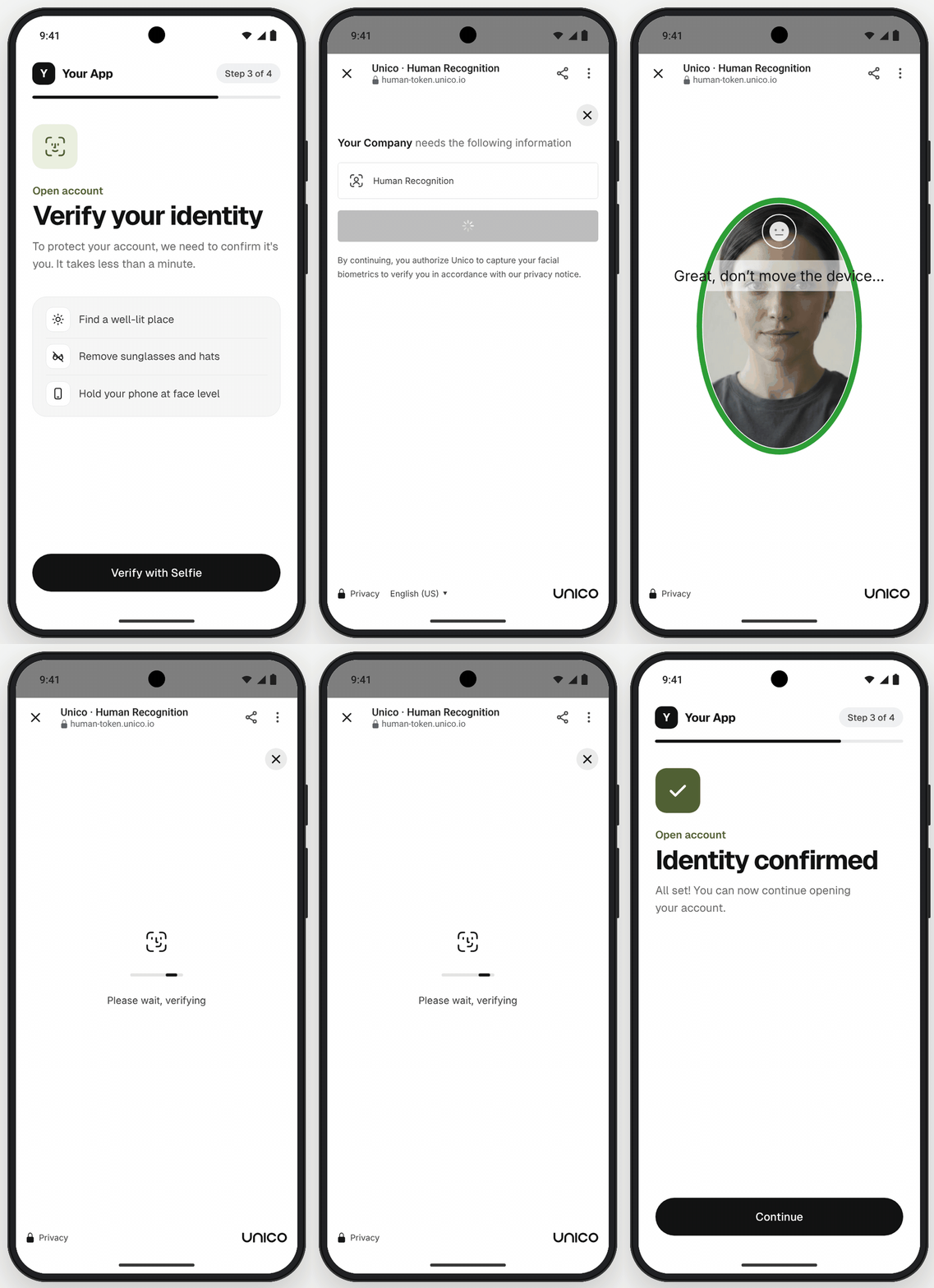
Custom Tabs launch the Human Token Journey in a browser tab inside your app. When the journey finishes, the browser redirects to your custom URL scheme and your app intercepts it.
What the user sees
Prerequisites
- Android 8 (API 26) or later
androidx.browser:browser:1.5.0- A unique URL scheme for your app (e.g.
myapp)
Step 1: Add the dependency
In your build.gradle:
implementation("androidx.browser:browser:1.5.0")
Step 2: Define your URL scheme
Choose a unique scheme (e.g. myapp). This is used as the callbackUri when creating the process:
callbackUri: myapp://callback
Create the process with the Human Plugin API and send this value as callbackUri. See Create a process.
Step 3: Create the activity
import android.content.Intent
import android.net.Uri
import android.os.Bundle
import androidx.appcompat.app.AppCompatActivity
import androidx.browser.customtabs.CustomTabsIntent

class HumanTokenActivity : AppCompatActivity() {

    override fun onCreate(savedInstanceState: Bundle?) {
        super.onCreate(savedInstanceState)

        val url = intent.getStringExtra(EXTRA_PROCESS_URL) ?: return finish()

        CustomTabsIntent.Builder()
            .build()
            .launchUrl(this, Uri.parse(url))
    }

    override fun onNewIntent(intent: Intent) {
        super.onNewIntent(intent)
        intent.data?.let { uri ->
            if (uri.scheme == "myapp") {
                // Journey completed — send processId to your backend
                val processId = uri.getQueryParameter("id")
                handleResult(processId)
            }
        }
    }

    private fun handleResult(processId: String?) {
        // Fetch the result from your backend via Get Process
        finish()
    }

    companion object {
        const val EXTRA_PROCESS_URL = "process_url"
    }
}
Step 4: Configure AndroidManifest.xml
<uses-feature android:name="android.hardware.camera" android:required="false" />
<uses-permission android:name="android.permission.CAMERA" />

<activity
    android:name=".HumanTokenActivity"
    android:launchMode="singleTop"
    android:exported="true">
    <intent-filter>
        <action android:name="android.intent.action.VIEW" />
        <category android:name="android.intent.category.DEFAULT" />
        <category android:name="android.intent.category.BROWSABLE" />
        <data android:scheme="myapp" android:host="callback" />
    </intent-filter>
</activity>
singleTop ensures Android calls onNewIntent() on the existing activity instead of creating a new one.
Step 5: Launch the journey
val intent = Intent(this, HumanTokenActivity::class.java)
    .putExtra(HumanTokenActivity.EXTRA_PROCESS_URL, processLink)
startActivity(intent)
File summary
| File | Purpose |
|---|---|
build.gradle | androidx.browser dependency |
HumanTokenActivity.kt | Custom Tabs launch + redirect handling |
AndroidManifest.xml | Intent filter for your URL scheme |
Using a WebView instead of Custom Tabs
Custom Tabs is the recommended approach. It is more secure, handles redirects natively, and requires less configuration. Only use a WebView if Custom Tabs is not an option in your project.
If you must use a WebView, the journey requires JavaScript, DOM storage, autoplay media, and camera/geolocation permissions to be granted explicitly. Without these settings the capture frame will not load or the camera will not activate.
webView.settings.javaScriptEnabled = true
webView.settings.domStorageEnabled = true
webView.settings.mediaPlaybackRequiresUserGesture = false
webView.settings.setGeolocationEnabled(true)

webView.webChromeClient = object : WebChromeClient() {
    override fun onPermissionRequest(request: PermissionRequest) {
        if (PermissionRequest.RESOURCE_VIDEO_CAPTURE in request.resources) {
            request.grant(arrayOf(PermissionRequest.RESOURCE_VIDEO_CAPTURE))
        } else {
            request.deny()
        }
    }

    override fun onGeolocationPermissionsShowPrompt(
        origin: String,
        callback: GeolocationPermissions.Callback
    ) {
        callback.invoke(origin, true, false)
    }
}
You must also declare CAMERA, INTERNET and ACCESS_FINE_LOCATION permissions in your AndroidManifest.xml and request the camera and location permissions at runtime before loading the journey URL.
<uses-permission android:name="android.permission.INTERNET" />
<uses-permission android:name="android.permission.CAMERA" />
<uses-permission android:name="android.permission.ACCESS_FINE_LOCATION" />