iOS
ASWebAuthenticationSession을 사용하여 iOS 앱에 Human Token Journey를 통합하세요.
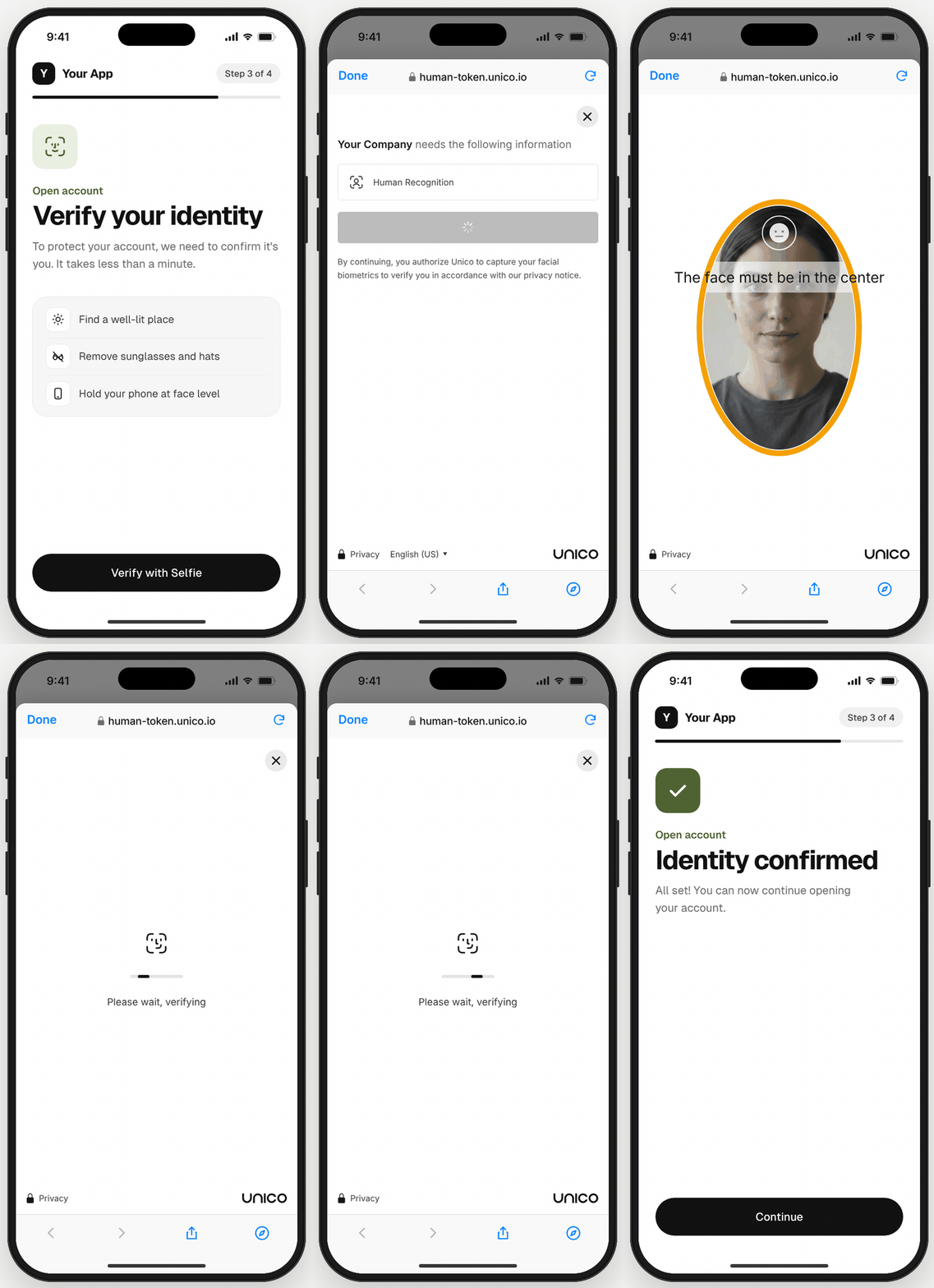
ASWebAuthenticationSession은 시스템 관리 브라우저에서 Human Token Journey를 실행합니다. 여정이 완료되면 등록된 URL 스킴을 통해 앱으로 세션이 돌아옵니다.
사용자에게 보이는 화면
사전 요구 사항
- iOS 13 이상
- Xcode 14+
AuthenticationServices프레임워크 (내장)- 앱의 고유한 URL 스킴 (예:
myapp)
단계 1: URL 스킴 정의
고유한 스킴을 선택하세요 (예: myapp). 프로세스 생성 시 callbackUri로 사용됩니다:
callbackUri: myapp://callback
Human Plugin API로 프로세스를 생성하고 이 값을 callbackUri로 전송합니다. 프로세스 생성를 참고하세요.
단계 2: 프레젠테이션 컨텍스트 프로바이더 생성
import AuthenticationServices
import UIKit

class UnicoAuthenticationController: NSObject, ASWebAuthenticationPresentationContextProviding {
    func presentationAnchor(for session: ASWebAuthenticationSession) -> ASPresentationAnchor {
        guard let windowScene = UIApplication.shared.connectedScenes.first as? UIWindowScene,
              let window = windowScene.windows.first else {
            return ASPresentationAnchor()
        }
        return window
    }
}
단계 3: 세션 매니저 생성
import AuthenticationServices

class AuthenticationSessionManager {
    static let shared = AuthenticationSessionManager()
    private var session: ASWebAuthenticationSession?
    private let contextProvider = UnicoAuthenticationController()

    func start(url: URL, completion: @escaping (String?) -> Void) {
        let newSession = ASWebAuthenticationSession(
            url: url,
            callbackURLScheme: "myapp"
        ) { callbackURL, error in
            self.session = nil
            if let callbackURL = callbackURL {
                let components = URLComponents(url: callbackURL, resolvingAgainstBaseURL: false)
                let processId = components?.queryItems?.first(where: { $0.name == "id" })?.value
                completion(processId)
            } else {
                completion(nil)
            }
        }
        newSession.presentationContextProvider = contextProvider
        newSession.prefersEphemeralWebBrowserSession = true
        newSession.start()
        session = newSession
    }
}
단계 4: 여정 시작
guard let url = URL(string: processLink) else { return }

AuthenticationSessionManager.shared.start(url: url) { processId in
    if let processId = processId {
        // Journey completed — send processId to your backend via Get Process
    } else {
        // User canceled the session
    }
}
정보
callbackURLScheme 매개변수는 스킴 이름만 (myapp) 허용하며, ://는 포함하지 않습니다.
파일 요약
| 파일 | 목적 |
|---|---|
UnicoAuthenticationController.swift | 프레젠테이션 컨텍스트 프로바이더 |
| 세션 매니저 (뷰 또는 서비스) | ASWebAuthenticationSession 생명주기 |