Capture Standard
To achieve better results in image capture, a capture standard has been defined. The image should be clear with sufficient frontal lighting. The face should be straight, facing the camera, free from objects or obstructions, and with a neutral expression.
The most common reasons for capture rejection or low scores are:
- Lighting behind the client
- Overexposed lighting
- Face too close to the camera
- Blurry images
- Shaky images
- Client wearing glasses
The platform follows the ICAO standard (International Civil Aviation Organization). The requirements below apply to selfie captures.
Face positioning
- Frontal — the subject looks directly at the camera, head upright, face centered.
- Shoulders — aligned and parallel to the camera's image plane.
- Eyes — naturally open, pupils and irises visible.
- Expression — neutral. No smiling, raised eyebrows, squinting, or frowning.
- Hair — must not cover the visible eye area.
- Coverings — no glasses, hats, caps, or masks.
Lighting and background
- Background — light, smooth, no texture. No spots, lines, curves, people, furniture, patterns, or plants. Light blue or white work well, provided there is sufficient contrast between the face/hair and the background.
- Lighting — adequate and uniform, equally distributed across the face. No shadows behind the face.
- Brightness and contrast — good contrast between hair, face, and background.
- Color — images must be in color. No grayscale.
Image formats
Accepted formats: JPEG, PNG, JWT.
Selfies
| Property | Value |
|---|---|
| Recommended resolution | 1080×1920 (portrait) or 1920×1080 (landscape) |
| Orientation | Portrait |
| Maximum size | 800 KB (compress to JPEG quality 92 if needed) |
Documents
| Property | Value |
|---|---|
| Recommended size | HD — 1280×720 or 720×1280 |
| Minimum size | VGA — 640×480 or 480×640 |
| Orientation | If OCR is used, capture in reading orientation |
| Maximum size | 800 KB (compress to JPEG quality 92 if needed) |
| Framing | Avoid excessive empty space around the document. Large unused borders degrade document classification. |
A compliant photo:
- Is in color with proper framing.
- Is sharp and clearly focused, free of ink marks or creases.
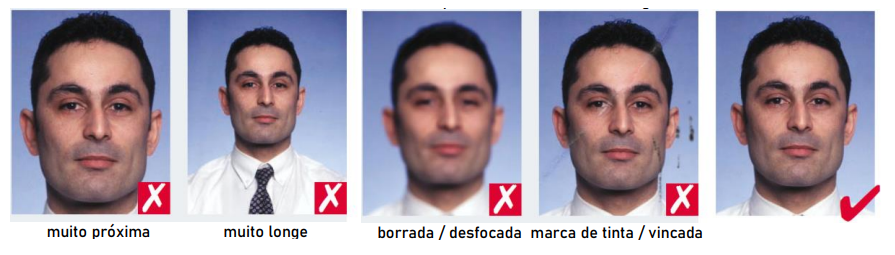
- Shows the subject looking directly at the camera with natural skin tone.
- Has appropriate brightness and contrast.
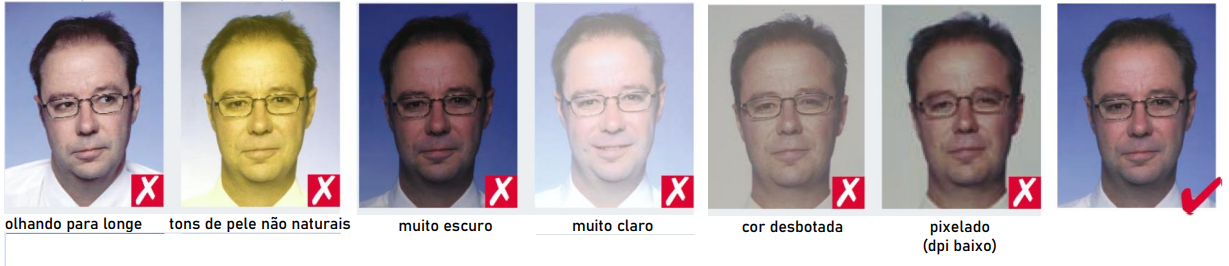
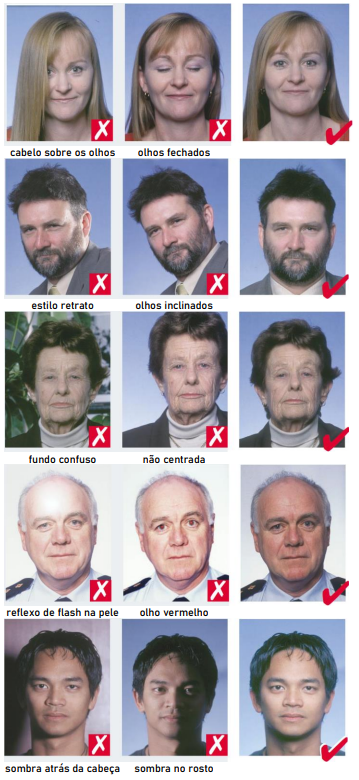
- Has a neutral expression with eyes clearly visible — no hair covering them.
- Is face-on: not over the shoulder, not tilted, both edges of the face visible.
- Has a simple, light-colored background — preferably white.
- Has even lighting — no shadows, no flash reflections, no red-eye.
- Has no colored contact lenses and no makeup that significantly alters appearance.
Glasses
The photo should be captured without glasses. If the subject must wear them:
- Eyes must be clear in the photo, with no flash or ambient-light reflections on the lenses.
- Frames must not cover any part of the eyes.
- No colored lenses.
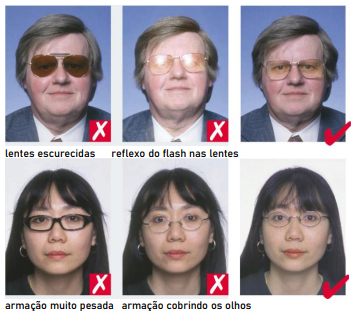
Image quality guidelines are derived from ICAO MRTD Photo Guidelines (Annex A).
Add pre-capture instructions
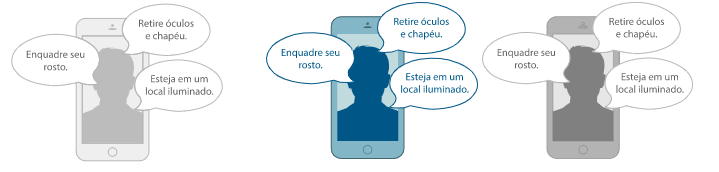
Show the subject, in plain language, what they need to do before the camera opens — remove glasses, find good lighting, maintain a neutral expression. A short instruction screen drastically reduces retries.
Use capture frames
Display a guide overlay that helps the subject position their face or document correctly within the frame.